
L4D2’s port was great when I played it, and Valve even made a big triumphant blog post with all the benchmarks proving it worked better than the Windows binary. Maybe your confusing it with Dying Light? That native port was so incredibly trash that everyone forced Proton on to avoid it.


Linux server admin, MySQL/TSQL database admin, Python programmer, Linux gaming enthusiast and a forever GM.
- 1 Post
- 16 Comments
Joined 3 years ago
Cake day: June 8th, 2023
You are not logged in. If you use a Fediverse account that is able to follow users, you can follow this user.
 21·19 days ago
It’s not “just” a solar panel, to be legally compliant in Germany. The part you plug in is basically a control unit. They aren’t super big and complex, but they need to be able to do 2 things:
-
Detect if there’s a live circuit, and not transmit any power if not. This is because sometimes electricity is turned off for maintenance. You don’t want an electrician dying because a line they turned off is actually live due to someone having this plugged in.
-
Power limiter, similar in function to a circuit breaker. This prevents overcurrents happening in your walls and starting a fire. Because all of this is happening after a house’s breaker box, they won’t flip if the combined grid + solar current is too high, so the solar unit’s control unit has to be able to deal with it.
Disclaimer: I’m a layman, not an electrician. Just read into the tech because it’s interesting to me.
-
“You can’t have programs that do multiple things! Any program that is multi-use is ebil. Standardized syntax and functionality between different related systems? NO! PROGRAM DO ONE THING!”
Here’s an absolute classic unix koan about the terminal:
One evening, Master Foo and Nubi attended a gathering of programmers who had met to learn from each other. One of the programmers asked Nubi to what school he and his master belonged. Upon being told they were followers of the Great Way of Unix, the programmer grew scornful.
“The command-line tools of Unix are crude and backward,” he scoffed. “Modern, properly designed operating systems do everything through a graphical user interface.”
Master Foo said nothing, but pointed at the moon. A nearby dog began to bark at the master’s hand.
“I don’t understand you!” said the programmer.
Master Foo remained silent, and pointed at an image of the Buddha. Then he pointed at a window.
“What are you trying to tell me?” asked the programmer.
Master Foo pointed at the programmer’s head. Then he pointed at a rock.
“Why can’t you make yourself clear?” demanded the programmer.
Master Foo frowned thoughtfully, tapped the programmer twice on the nose, and dropped him in a nearby trashcan.
As the programmer was attempting to extricate himself from the garbage, the dog wandered over and piddled on him.
At that moment, the programmer achieved enlightenment
Source: https://catb.org/~esr/writings/unix-koans/gui-programmer.html
 25·7 months ago
DESKTOP! Wait, snake desktop? How’d that get in the script?
Just get it from the AUR.
That sentence has a very different meaning to Romanians :))
I’m on Fedora with Plasma & Wayland, everything just works… Honestly not sure if Fedora is doing something special or all this talk of Plasma being crashy is overblown.
 11·11 months ago
/me eating popcorn as a nano user
In Uni I ran Gentoo as my daily driver. It was stupid, but I learned a lot.
Trying and failing to get a working desktop environment, using IRC on the command line to get help from people who knew what they were doing and could advise a dumb kid like me, following their advice and getting a working DE after a reboot was the most hackerman I ever felt. I was convinced I was real hot shit. In actuality, I’d followed the advice to tweak the kernel config to get working drivers :))
 1·1 year ago
Non-German but I am in the EU. Didn’t find it odd at all. Just assumed it was “flow market” in German.
No, this is a very old joke that uses the fact the command has “fr” in it to trick people about what the command does. Joking aside, here’s what the command actually does:
rmis the command to delete files and folders-fis the force modifier. This means it’ll keep going even if it encounters problems and just delete as much as it can-ris the recursive modifier. That means it’ll go down every folder it sees in the target and delete the contents as well, and delete the contents of folders of folders, etc./is the target. This is the root of the filesystem. If you’re used to Windows, that’s like targetingC:.Put it all together, and this command basically deletes your whole filesystem. A safeguard was put in place a while back due to people meming about this and causing newbies to delete their whole system. Now it won’t work unless you put in
--no-preserve-root, which tellsrmthat yes, you really mean it, please delete my whole system./*as the target works around that safeguard, because technically deleting everything in root is not the same as deleting root itself.
And to avoid annoying error messages about preserving the root of the language, add a
*at the end. Final command should look like this:sudo rm -fr /*
Again, unless something has gone wrong, the grub config should auto-detect the other Linux distros installed and add them to the boot menu. It should look like this:
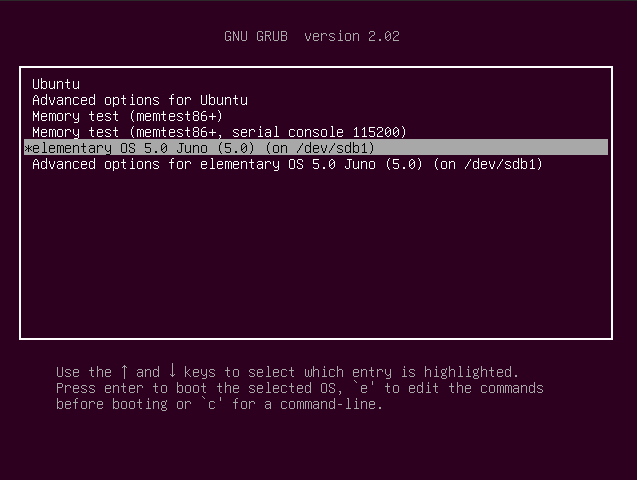
EDIT: Also, what can happen is that the grub timeout (the time that menu is on screen) is set to 0 seconds. You can get the grub menu to stay up by holding left shift during boot if that’s the case.
Grub does not do the same thing unless something has gone wrong. It detects windows and offers you the choice on boot as to which OS to start.

Ia! Ia! Torvalds fhtagn!